The solution
Students can swap, drop or pick up a shift, or ask for time off, in a few taps. Every request shows where it stands. Supervisors get a short list to approve instead of an inbox, and simple swaps go through on their own.
The problem
Student shifts ran on paper and email.
At Syracuse, student jobs ran on pen and paper, a shared doc and email. If I wanted to swap a shift, I had to find my supervisor in person, or email and wait. More than once I was still waiting the day the shift started.
Students have classes. Every request went to one supervisor, who said yes or no to each one by hand.
1. Find your supervisor. In person, or send an email.
2. Wait. Sometimes a day, sometimes two.
3. Hope you hear back. Ideally before the shift starts.
Key decisions
Open shifts: only the ones you can work
The app only shows shifts you can actually work: no class clash, under your weekly hours, and you're trained for the station.
I didn't want first come, first served. That favors whoever is holding their phone, and students are in class.
Swap: three short steps
Swapping takes three short steps: who, which shift, review. I split it up because one long form feels like homework.
The last screen says what happens next, so nobody hits send without knowing.
Drop: it stays yours until someone takes it
A dropped shift stays yours until someone takes it, and the screen says so before you confirm.
That might feel unfair. I'd rather say it up front than have someone find out later.
Supervisor approvals: only what needs a person
Supervisors are on the floor, not at a desk, so this is built for a phone. Each request shows what it does to coverage.
Simple swaps go through on their own, so this list only has the ones that need a person. If everything needed a tap, I'd have rebuilt the email problem.
Edge cases I designed for
What if someone takes the shift first?
A sheet says someone just took it, and shows similar shifts that are still open.
What if a coworker doesn't answer a swap in time?
The request ends after 4 hours and your shift doesn't change. You can ask someone else or keep your shift.
What if the supervisor doesn't answer?
They get a reminder after 2 hours. After 4 hours, it goes to the manager.
What if a drop leaves a shift short?
Drops always go to the supervisor, who sees the coverage change first. If the shift is still open 12 hours before, the supervisor steps in.
What if a swap puts someone near the weekly hours cap?
It goes to the supervisor with a note saying why: Jamie would be at 19 of 20 hours.
What if there's no connection?
You still see your schedule, but you can't send requests until you're back online.
What if a request fails to send?
The app says your shift has not changed, and you can try again or save it as a draft.
What if a student drops a shift by mistake?
An Undo button shows for 10 seconds.
What if no open shift fits?
The screen says nothing fits right now, and offers an alert for new shifts.
Accessibility
I looked at all 916 pieces of text on the screens. 139 were too light to read easily, mostly gray text on tinted backgrounds. I changed one color and they were all fixed.
I also made buttons, switches and filters big enough to tap comfortably. They were 28 to 35 pixels tall. Now all are 44 pixels or taller. Bigger buttons pushed content down, so five screens needed tighter spacing.
Results
I tested the first version with 8 friends who work at Food Services. All 8 swapped a shift on the first try. Scheduling a shift in the app takes under 30 seconds. On paper it took about 30 minutes.
The redesign hasn't been tested yet. It has 38 screens across 9 user flows, for students and supervisors.
How I got there
Research
A few buildings over, Residential Aides used an app called Sub It Up. You open it, see what's open, and grab it. Nobody has to say yes first. I wanted that for Food Services.
I sent a survey to my coworkers at Halal Shack. About 20% answered. That's not many, but the answers matched what people said in the kitchen. The biggest complaint was scheduling. Then communication. Then swapping and dropping.
Competitive analysis
I also looked at four scheduling tools: Sub It Up, When I Work, Shiftboard and Deputy. The last three are built for businesses. None of the ones I checked looks at a student's classes or weekly hours before letting them take a shift. So I built for students.
The idea
What hurt most was the waiting. Waiting for an email back. Waiting to catch my supervisor at the desk. So I asked what it would look like if the app did the waiting instead of me.
Lived it. Worked the job for two years. Asked. Surveyed my coworkers. Compared. Four scheduling tools. Mapped. Sorted the research, drew nine user flows. Designed. Sketches, then 38 screens. Tested. 8 friends, on the first version.
User flows
Before drawing any screens, I mapped how each task would go: swap, drop, pick up a shift, time off, first-time setup, notifications, hours, error cases and the supervisor side. Each map shows who does what, so I could see where a request might get stuck.
Design system
I set up the colors, spacing and text styles once, and built buttons, switches and other pieces to reuse. So when I change something, it changes on every screen.
Other flows
Home
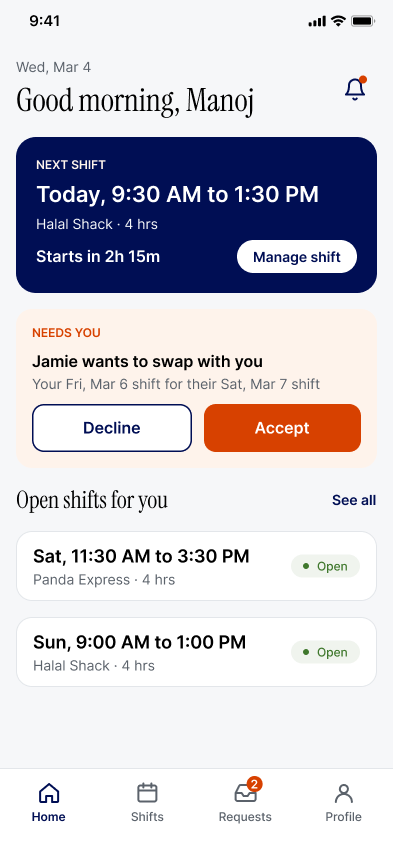
When a student opens the app, they want to know three things: what's my next shift, does anything need me, and is anything open. That's all that's on the screen. They're usually between classes, so it has to be quick.
Every request has a status
Swaps, drops and time off sit in one list. Each shows who it's with, the steps, and how long is left.
The old way left you wondering. A clear status means nobody has to ask if it went through.
Notifications: the app tells you, so you don't check
Anything waiting on you sits at the top. Everything else is listed below, with quiet hours so it doesn't buzz at night.
Students used to check email all day. Now the right thing finds them, and urgent things still get through.
Hours and earnings
Students wanted to track their hours and what they'd earn. Food Services already handles pay in MySlice, so I show an estimate, say it's an estimate, and link to MySlice for the real number.
Supervisor schedule
A week at a glance, with the number covered at the top of each day. Gaps are easy to spot, and open shifts sit on their own row. Tap a gap to post it.
First-time setup
Classes, availability and reminders. Setup asks for your classes, when you can work, and what you want to hear about. You can connect a calendar, upload a file or add classes by hand.
The rest of the supervisor app
What I'd do differently
You don't need a lot of features to solve a real problem. The first version did three things: schedule, swap, drop. The redesign does more, but each piece comes from something people were stuck on. I left out time tracking and payroll on purpose.
Test with people I don't know
I tested the first version with friends. They're friends, so they were kind. Next I want to test with five students and one or two supervisors I don't know.
Check my numbers with Food Services
A few numbers in the redesign are my guesses, like the 20 hour weekly cap and the hourly rate. Food Services would need to confirm them. The auto-approve rules need their sign-off too.
Finish what's only partly there
Some things from my research are only partly designed. Chat with a supervisor isn't designed yet, and neither is sending a swap to a whole group. Past shifts aren't shaded yet, and shift details don't show job responsibilities.
Build it
It's still a design concept, and I'd like to build it with Food Services.